WHAT'S NEW?
Loading...
Kiinalaiset ruokakalat, ovat usein koostumukseltaan samankaltaisia Suomalaisen järvikalan kanssa. Liha on siis vähärasvaista, kuivahkoa ja miedon makuista (mautonta).
Lohi on Kiinassa kallista, eikä kuulu kovin usein ruokapöytään. Rapuja ja muita mereneläviä kyllä on useimmiten pöydässä. Kiinalainen kalanlaitto tyyli sopii siis hyvin Suomalaiselle kalalle kuten ahven, hauki, kuha, lahna jne. Lohi on tähän liian rasvaista ja sehän on jo herkullista ihan ripauksella suolaa, eikä muuta kaipaakaan.

Paisto soija- viinietikka marinadissa
1. Tee Kiinalainen marinadi vaaleasta soijakastikkeesta, tummasta soijakastikkeesta ja tummasta riisiviinietikasta. Lisää vielä sokeria ja ruokaviiniä. Ruokaviinin sijasta käy myös viski tai sake.
Tummaa riisiviinietikkaa on vaikea löytää, mutta ainakin Oriental Market hakaniemessä myy sitä myös verkkokaupan kautta->(Chinkiang Vinegar). Ruokaviiniä ei voi myydä verkossa, koska siinä on alkoholia.

2. Perkaa ensin kala puhtaaksi, ja hiero sitten pintoihin vehnäjauhoa. Paista kalaa molemmilta puolilta oliiviöljyssä/rypsiöljyssä, kunnes jauhot hieman ruskistuvat ja liha on jokseenkin kypsää.

3. Ota kala pois pannulta, lautaselle.

4. Lisää pannulle oliiviöljyn joukkoon valkosipulia, purjosipulia, inkivääriä ja anista. Paista niitä kunnes ne alkavat tuoksua.

5. Laita kala takaisin pannulle, ja lisää joukkoon aluksi valmistettu marinadi. Lisää myös tilkka vettä. Anna sitten kiehua noin 10 - 20 minuuttia. Kiehutusaika vaikuttaa siihen, miten paljon makua kalaan imeytyy, kala on jo kypsää joten kypsennyksen vuoksi ei kalaa enää marinadissa pidetä. Marinadin täytyy kiehua jonkin verran, hauduttamisesta ei ole kyse. Kansi on hyvä laittaa wokkipannun päälle, ettei marinadia räisky ympäriinsä.
Vahdi kalaa koko ajan, ettei marinadi pääse kokonaan haihtumaan. Sillon kala palaa pannuun kiinni.

Vaiheet 2 ja 5
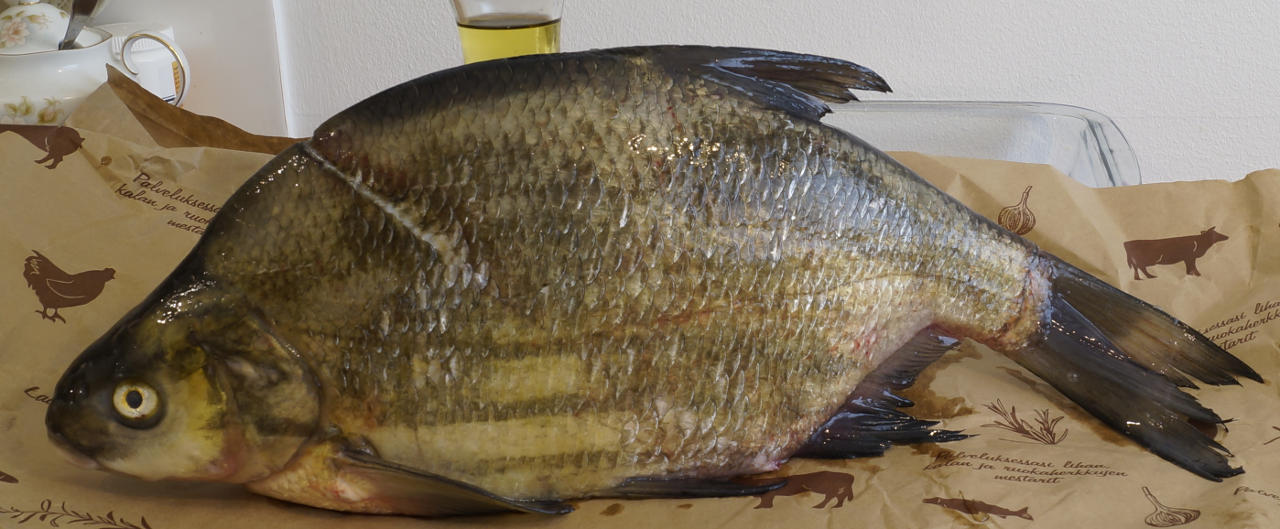
Tarjoile Kiinalaiseen tapaan valmistettu lahna vaikkapa riisin ja okran kanssa. Paras riisi Kiinalaiseen ruokaan on tavallinen puuroriisi, joka keitetään vähäisessä vedessä. Jos kattilaan tai riisikeittimeen laittaa 1cm paksuudelta riisiä, tulee sen päälle 1cm vettä, niin että riisin päällä on 1cm vettä. Riisiä keitetään niin kauan kunnes vesi on imeytynyt, silloin riisi on tahmaista mutta ei vielä puuroa.


Lahna, vähemmän arvostettu ruokakala

home brew stout/porter

LeFuuuuuuuuu! Beer is out! Only one left, what to do.
More of course.

So I don't have any yeast, but I have one beer from the last #3 brew. It should have yeast in it, so I'm going to see if that can be used as a starter to get the fermenting started.

I'll do 15 liters with 6 kg malts, to get thick and dark like the last brew #3.

  • 400 g Chocolate wheat malt
  • 400 g CARA Crystal
  • 100 g Black
  • 5,1 kg VikingMalt Pale Ale
In to boil:
  • 25 g licorice root
  • 30 g juniper berries
  • 25 g Zeus hops
  • 25 g Brewers Gold
I brought the temperature to 65 C starting from 45 C in one hour. Then 2 hours in 67 C.
Only yeast I used was the ones found on the bottom of one bottle, from the last brew #3. Fermentation started really slowly, it took several days to start to get bubbles from the airlock.
But the fermentation ended normally after two weeks. Added about 56 g sugar before bottling.
After 3 weeks there is quite a lot of carbon, and it makes lots of foam when poured into glass.


Christmas beer 2015


Here is yet another improvised brew, containing Vikingmalt Sahti malt. Sahti is a traditional Finnis beer like brew, but quite different than beer (read more here). I like Sahti, so let's use those malts everywhere. Oh, and juniper twigs too of course! (see: sahti, koduõlun, gotlandsdrickan, maltølin)


I decided to try methods used in brewing Sahti, to my 2015 Christmas beer. One important part of Sahti brew, is very long mash time, for maximum transformation to get high alcohol content (8-10%) and sweetness.


So I decided to do double mash, using the same wort.

  1. Do first mash 11 hours
  2. Normal sparge
  3. Change in new malts
  4. Do a second mash 1,5 hours
  5. Normal sparge again

First mash 11 hours

Grainfather
In first mash (beta amylase) the goal was to maximize sugar output from Sahti malts. So I did 39  ̊C 0.5 hours, 49  ̊C 0.5 hours and 63  ̊C 10 hours. And then I forgot to measure gravity. Mash water amount 22 litres, against the rules of Grainfather manual..

Second mash 1.5 hours

Second mash (alpha amylase) was pretty much normal, 68  ̊C 1.5 hours to get some nonfermentable sugars and to get some taste out of Pale Ale, Cara Crystal and Black.

Finally I boiled with Irish moss bout 15 minutes, and on the 5 minute mark, I added the juniper twigs, hops, cinnamon, anise and some oak chips soaked in Monnet cognac.


Boil

Into boil I added some hops and herbs, on 5 minute mark.
  • 4 g Anise
  • 10 g Brewesr Gold
  • 10 g Zeus
  • 43 g Juniper twigs
  • 1 cinnamon stick
  • some lemon peels
  • Monnet soaked oak chips


Result

The result was a dark and thick wort. OG was 1.080. Fermenting produced A LOT of foam, that came out from the airlock. This has not happened with wort's with smaller OG.
Now that the beer has been in a bottle for one week, I'm happy with the final product. Extremely full bodied, sweet and tasty, yet there is noticeable saltiness from the ~2 dl of Monnet cognac put into the boil. OG.08 FG.02 gives about 7.8%


Brewing Sahti using Grainfather (1'st attempt)

So we purchased a Grainfather beer mashing cattle. My firs thought of course was to brew Sahti, the traditional Finnish beer. I could not follow all the right steps in the process, but I think it's the ingredients that make the most of it's flavour and aroma. Basically the only missing step was filtering the mash through juniper twigs, so that will affect the taste.

Grainfather

Grainfather is a small brewing system that is easy to use. Pump is circulating the wort so the temperature stays even from the bottom to the surface, and mash is well wetted all the time. The cooling water hose can be attached thos shower tap using a quick connect adapter.


Good recipe is available on Brewtoad, allthough, none really is like the traditional ones. These recipes work well with Grainfather.

Sahti Malts

I used 5kg of Viking Malt - Sahti Malt and 400g of very dark TUOPPI Rye Malt, ~60g Saaz and 100g Juniper beries while the batch was 19 litres. The Rye Malt is available world-wide from Suomikauppa. Yeast is a baking/bread yeast, that produces banana flavour. The Finnish Rye Malt is an excellent addition to many other dark beers as well.
Sahti must have much more malts used in it than a beer. Average beer has about 160g/l but Sahti has 400g/l malts in it.


I used only little less mals than Sahti requires. The wort in fermentation looked like this.


The results

Allready in the second day the fermentation produced banana flavour sent. My mistake was to add too much yeast in it, and it had a negative effect on the taste. OG was about 1.066 and FG 1.016 after a one week, so that gives it about 6.6% alcohol content by volume. Another mistake was not to use the required 400g/l malts, and the result was just a bad beer, not Sahti.


AVRISPmkII in Kubuntu 12.04


AVRISPmkII is not working in Precise Pangolin (64bit)


Trying to find the programmer:

jarkko@i7kubuntu:~$ avrdude -c avrispmkii -p x128a3 -P usb -v

avrdude: Version 5.11.1, compiled on Oct 30 2011 at 10:37:28
         Copyright (c) 2000-2005 Brian Dean, http://www.bdmicro.com/
         Copyright (c) 2007-2009 Joerg Wunsch
                                             
         System wide configuration file is "/etc/avrdude.conf"
         User configuration file is "/home/jarkko/.avrduderc"
         User configuration file does not exist or is not a regular file, skipping

         Using Port                    : usb
         Using Programmer              : avrispmkii
avrdude: usb_open(): cannot read serial number "error sending control message: Operation not permitted"
avrdude: usb_open(): cannot read product name "error sending control message: Operation not permitted"
avrdude: usbdev_open(): Found [unnamed product], serno: [unknown]
avrdude: usbdev_open(): error setting configuration 1: could not set config 1: Operation not permitted
avrdude: usbdev_open(): did not find any USB device "usb"


But as a root everything works fine:

root@i7kubuntu:~# avrdude -c avrispmkii -p x128a3 -P usb -v

avrdude: Version 5.11.1, compiled on Oct 30 2011 at 10:37:28
         Copyright (c) 2000-2005 Brian Dean, http://www.bdmicro.com/
         Copyright (c) 2007-2009 Joerg Wunsch

         System wide configuration file is "/etc/avrdude.conf"
         User configuration file is "/root/.avrduderc"
         User configuration file does not exist or is not a regular file, skipping

         Using Port                    : usb
         Using Programmer              : avrispmkii
avrdude: usbdev_open(): Found AVRISP mkII, serno: 000200038672
         AVR Part                      : ATXMEGA128A3
         Chip Erase delay              : 0 us
         PAGEL                         : P00
         BS2                           : P00
         RESET disposition             : dedicated
         RETRY pulse                   : SCK
         serial program mode           : yes
         parallel program mode         : yes
         Timeout                       : 0
         StabDelay                     : 0
         CmdexeDelay                   : 0
         SyncLoops                     : 0
         ByteDelay                     : 0
         PollIndex                     : 0
         PollValue                     : 0x00
         Memory Detail                 :

                                  Block Poll               Page                       Polled
           Memory Type Mode Delay Size  Indx Paged  Size   Size #Pages MinW  MaxW   ReadBack
           ----------- ---- ----- ----- ---- ------ ------ ---- ------ ----- ----- ---------
           eeprom         0     0     0    0 no       2048   32      0     0     0 0x00 0x00
           application    0     0     0    0 no     131072  256      0     0     0 0x00 0x00
           apptable       0     0     0    0 no       8192  256      0     0     0 0x00 0x00
           boot           0     0     0    0 no       8192  256      0     0     0 0x00 0x00
           flash          0     0     0    0 no     139264  256      0     0     0 0x00 0x00
           prodsig        0     0     0    0 no        512  256      0     0     0 0x00 0x00
           usersig        0     0     0    0 no        512  256      0     0     0 0x00 0x00
           signature      0     0     0    0 no          3    0      0     0     0 0x00 0x00
           fuse0          0     0     0    0 no          1    0      0     0     0 0x00 0x00
           fuse1          0     0     0    0 no          1    0      0     0     0 0x00 0x00
           fuse2          0     0     0    0 no          1    0      0     0     0 0x00 0x00
           fuse4          0     0     0    0 no          1    0      0     0     0 0x00 0x00
           fuse5          0     0     0    0 no          1    0      0     0     0 0x00 0x00
           lock           0     0     0    0 no          1    0      0     0     0 0x00 0x00

         Programmer Type : STK500V2
         Description     : Atmel avrispmkII
         Programmer Model: AVRISP mkII
         Hardware Version: 1
         Firmware Version Master : 1.13
         Vtarget         : 3.4 V
         SCK period      : 154.37 us

avrdude: AVR device initialized and ready to accept instructions

Reading | ################################################## | 100% 0.00s

avrdude: Device signature = 0x1e9742

avrdude done.  Thank you.


There are many threads on various forums how to fix this, but seems that I'm not the only one who does not understand the inner workings of udev. Luckily I found one thread here that has the solution.
One must create a udev rule for the programmer, to allow users to use it.

Create a udev rule file /etc/udev/rules.d/60-avrisp.rules and put the following text in it.

SUBSYSTEM!="usb_device", ACTION!="add", GOTO="avrisp_end"

# Atmel AVR ISP mkII
ATTR{idVendor}=="03eb", ATTR{idProduct}=="2104", MODE="660", GROUP="dialout"

LABEL="avrisp_end"

Then create a link to it in folder /etc/udev, restart udev service and add your user to the dialout group. Or maybe the plugdev would be a better group?

root@i7kubuntu:~#ln /etc/udev/rules.d/60-avrisp.rules /etc/udev/avrisp.rules

root@i7kubuntu:~#usermod -a -G dialout jarkko
root@i7kubuntu:~#service udev restart


Now you may haveto unplug and plug in the programmer again to make it work. I think I allso had to logout to see the new group in that users konsole.

jarkko@i7kubuntu:~$ groups
jarkko adm tty disk dialout cdrom sudo audio dip plugdev users lpadmin sambashare

If you know how to make this work easier, please share it in the comment section or email me so I can share it here.